
ファイルのダウンロードに関しての注意・手順
下記リンクは必ず一読してください
ご了承の上、ファイルのダウンロードをお願いいたします
概要
1か月のシフトを日ごとに作成するものです
作成年月と締め日、開始/終了時間、刻み時間、氏名を設定シートで設定することで、毎日のシフト表のベースができます
ファイルのダウンロード
使用手順
「設定」シートの設定
- 下記セルに値を入力/プルダウンリストから選択します
-
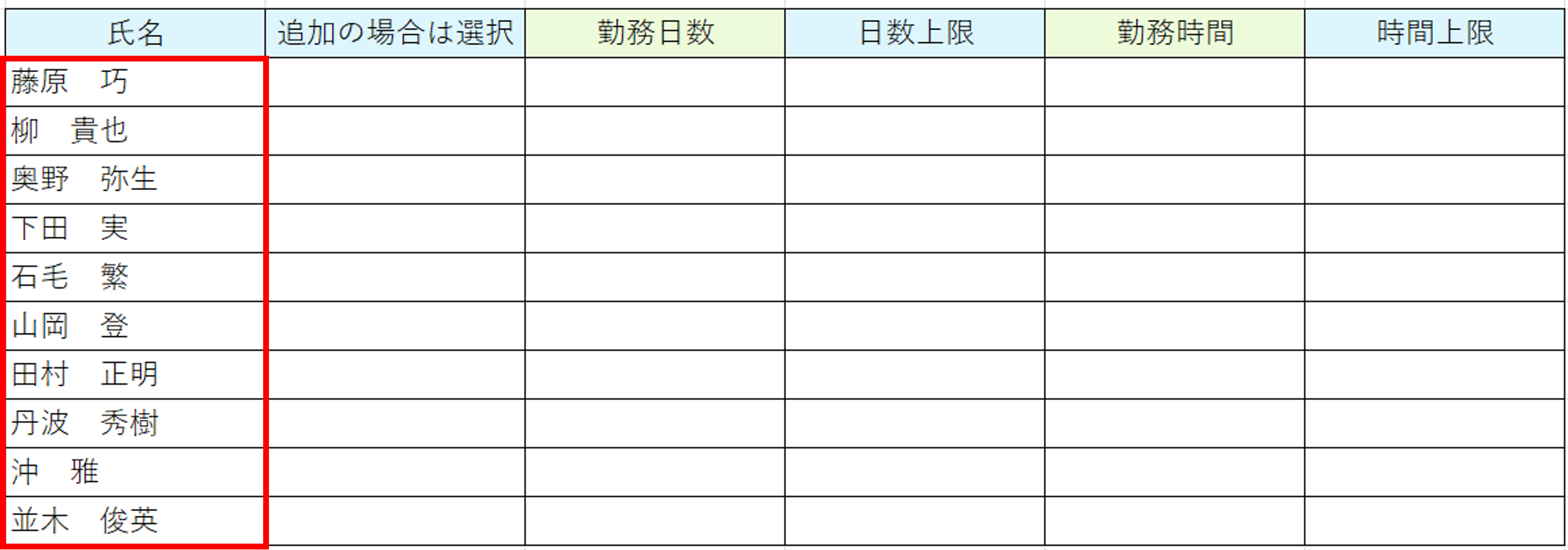
セルB8以降の行に氏名を入力します
この時点では「追加の場合は選択」欄は使用しません
(使用しても何も起きません) - セルB2の青色「作成 実行」のボタンをクリックします
| セル | 内容 | 備考 |
|---|---|---|
| C4 | 作成年 | 2026以上の整数を半角で入力します |
| E4 | 作成月 | 1~12の整数を半角で入力します |
| G4 | 締め日 | 10日、15日、20日、月末から選択します |
| C5 | 開始時間 | 0以上の整数を半角で入力します |
| E5 | 終了時間 | 0以上の整数を半角で入力します 日をまたぐ場合は24以上の整数を入力してください |
| G5 | 刻み時間(分) | シフト表の間隔の時間を設定します 10、15、20、30、60から選択します |


結果
- 締め日が月末の場合、作成年月の1日から月末までのシートが作成されます
- それ以外の場合は、締め日の翌日日付から月末日まで作成後、翌月の締め日までのシートが作成されます
- 各シートの開始時間が1行目に、刻み時間の分だけ2行目に時間が出力されます
- 1列目には氏名出力されます

シフトの入力
- シフトに入る人の該当の時間には「○」を、休憩時間には「休」を選択します
- 赤枠内には各シフトの時間の合計人数が表示されます

氏名の追加
-
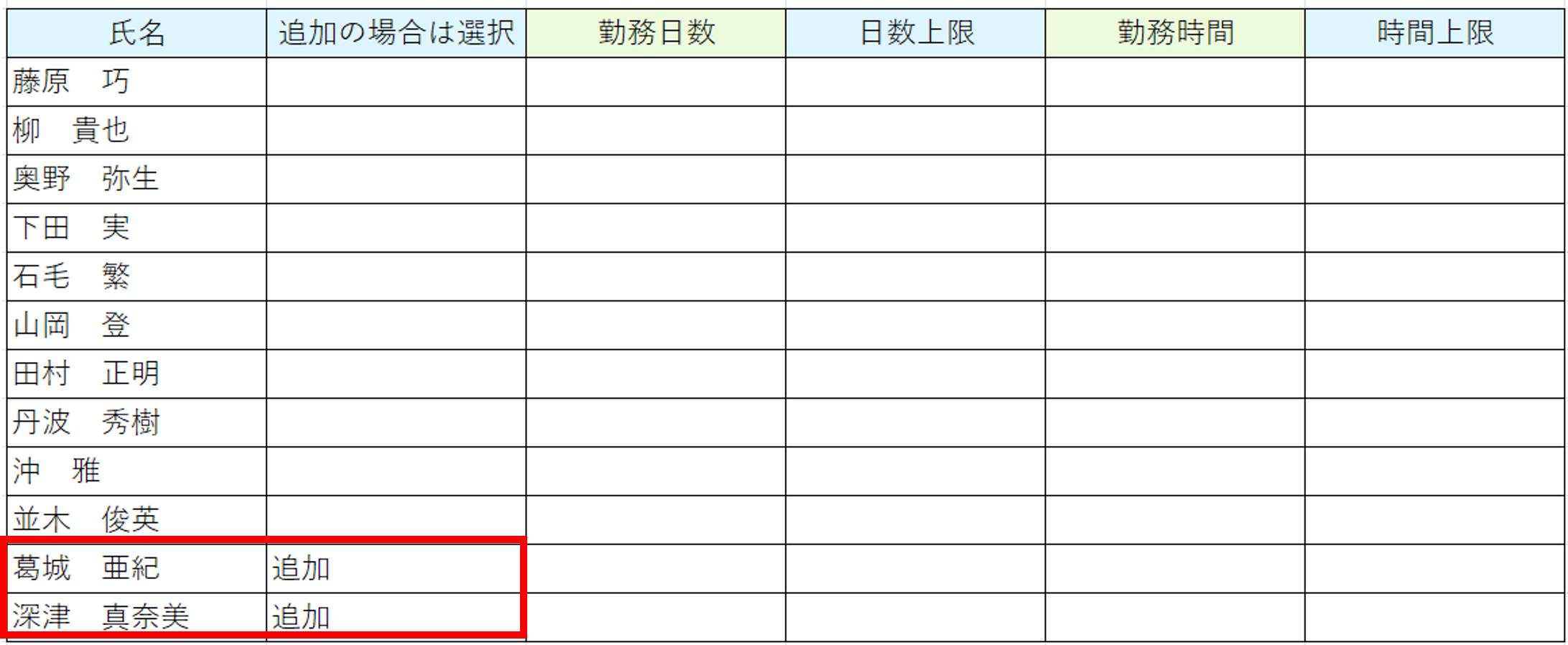
採用した人がシフトに入る場合、追加をする必要があります
その場合は、下に追加した後に、「追加の場合は選択」欄で「追加」を選択します
さらに別で追加する必要があるときは、すでに追加済みのものの「追加」は消してください - セルD2の緑の「追加 実行」 ボタンをクリックします
- それぞれのシートに名前が追加されます

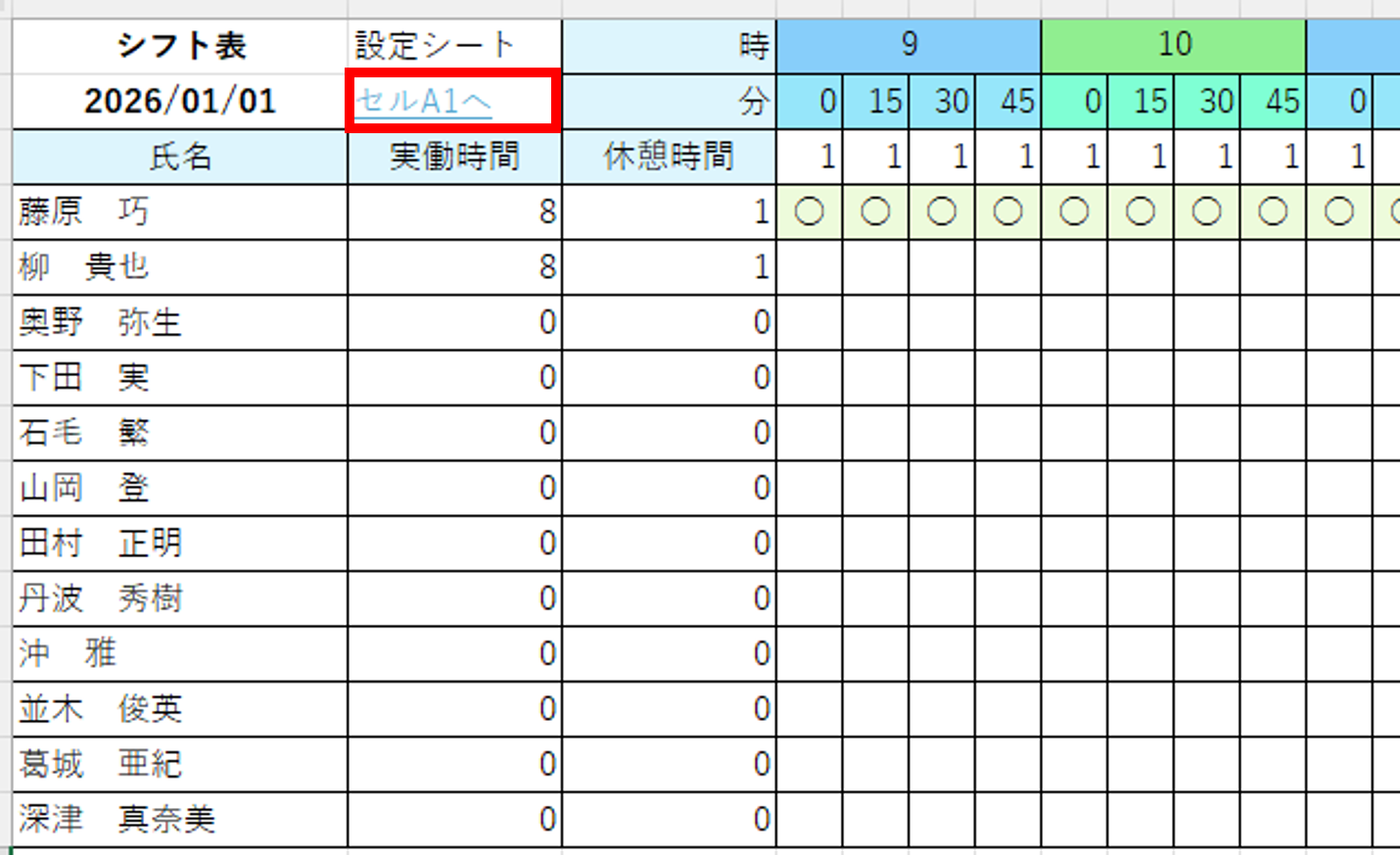
ハイパーリンク
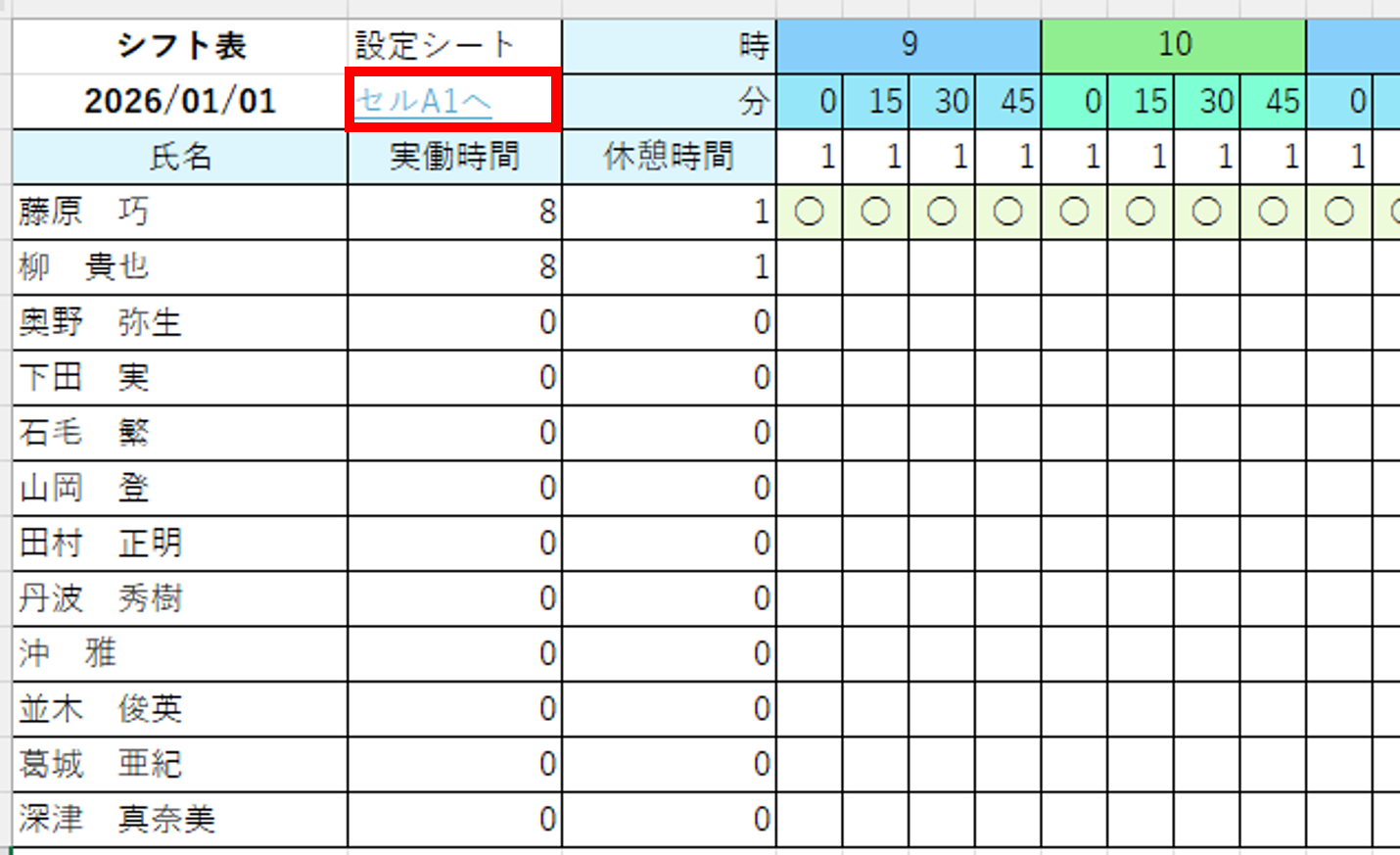
- 各日にちシートのセルB2には設定シートのセルA1へ飛ぶハイパーリンクが設定されています
- 勤務日数や勤務時間の確認をしたいときなどに便利かなと思います
勤務日数と勤務時間の反映
- シフト表を作成後、勤務日数や勤務時間を確認する場合は「設定」シートのオレンジの「勤務日数と勤時間 反映」ボタンを使います

注意
-
設定シートや原紙の行や列、セルの挿入はしないでください
マクロが正常に動作しないことがあります -
設定シートのプルダウンの内容の変更もできません
こちらもマクロが正常に動作しないことがあります - 原紙シートにはシートの保護をかけていますが、パスワードは設定していません
コード1
Sub makeShiftTable()
    'このファイルとシート
    Dim wb As Workbook 'このファイル
    Dim wsSet As Worksheet '設定シート
    Dim wsOriginal As Worksheet '原紙
    Dim wsCopy As Worksheet 'コピーしたシート

    '作成年月
    Dim aYear As Long, aMonth As Long
    '締め日
    Dim closingDate As String

    '作成日
    Dim aDay As Long

    '日付
    Dim aDate As Date

    '最大日数
    Dim maxDay As Long

    '開始時間/終了時間
    Dim startHour As Long, endHour As Long

    '刻み時間(分)
    Dim aMinute As Long
    Dim bMinute As Long

    '氏名
    Dim ArrName() As String
    Dim cntArrName As Long

    '刻み時間に対する原紙シートの列の間隔
    Dim colSpan As Long

    '列
    Dim colHour As Long
    Dim colMinute As Long

    '結合セル
    Dim rng As Range

    'カウンタ変数
    Dim i As Long, j As Long

    '動作が速くなるコード
    With Application
        .ScreenUpdating = False '画面遷移→しない
        .EnableEvents = False 'イベントの発生→しない
        .Calculation = xlCalculationManual '再計算→手動
        .Cursor = xlWait 'カーソル→ウェイト
        .DisplayAlerts = False '確認ダイアログボックスの表示→なし
    End With

    '動作
    Set wb = ThisWorkbook
    With wb
        Set wsSet = .Sheets("設定")
        Set wsOriginal = .Sheets("原紙")
    End With

    '設定シートの情報を変数・配列格納
    With wsSet
        aYear = .Range("C4").Value '作成年
        aMonth = .Range("E4").Value '作成月
        closingDate = .Range("G4").Value '締め日
        startHour = .Range("C5").Value '開始時間
        endHour = .Range("E5").Value '終了時間
        aMinute = .Range("G5").Value '刻み時間

        colSpan = 60 / aMinute '刻み時間に対する原紙シートの列の間隔

        '氏名
        cntArrName = 0
        i = 8
        Do While .Range("B" & i).Value <> ""
            ReDim Preserve ArrName(cntArrName)
            ArrName(cntArrName) = .Range("B" & i).Value
            cntArrName = cntArrName + 1
            i = i + 1
        Loop
        cntArrName = cntArrName - 1
    End With

    '原紙に開始時間と終了時間、刻み時間、氏名を反映させる
    With wsOriginal
        .Protect UserInterfaceOnly:=True 'マクロのみ値が入力できるようにする
        colHour = 4
        colMinute = 4
        For i = startHour To endHour
            '時間
            .Cells(1, colHour).Value = i

            If colSpan > 1 Then
                Set rng = .Range(.Cells(1, colHour), .Cells(1, colHour + colSpan - 1))
                rng.Merge
            Else
                Set rng = .Cells(1, colHour)
            End If
            rng.HorizontalAlignment = xlCenter
            If i Mod 2 = 0 Then
                rng.Interior.Color = RGB(144, 238, 144) '明るい緑
            Else
                rng.Interior.Color = RGB(135, 206, 250) '薄いスカイブルー
            End If
            colHour = colHour + colSpan

            '分
            bMinute = 0
            For j = 0 To colSpan - 1
                .Cells(2, colMinute).Value = bMinute
                If i Mod 2 = 0 Then
                    .Cells(2, colMinute).Interior.Color = RGB(127, 255, 212) '緑
                Else
                    .Cells(2, colMinute).Interior.Color = RGB(150, 230, 250) 'ブルー
                End If
                bMinute = bMinute + aMinute
                colMinute = colMinute + 1
            Next j
        Next i

        '氏名
        For i = 0 To cntArrName
            .Cells(i + 4, 1).Value = ArrName(i)
        Next i
    End With

    '締め日によって日付に入れるデータを変える
    If closingDate = "月末" Then
        aDay = 1
    ElseIf closingDate = "10日" Then
        aDay = 11
    ElseIf closingDate = "15日" Then
        aDay = 16
    ElseIf closingDate = "20日" Then
        aDay = 21
    End If

    '締め日に対する日付
    aDate = DateSerial(aYear, aMonth, aDay)

    '1日から月末日までの日数
    maxDay = Day(WorksheetFunction.EoMonth(aDate, 0))

    'その月の日数分だけ繰り返す
    For i = 1 To maxDay
        'シートをコピーし、最終シートの次のシートに持ってくる
        wsOriginal.Copy After:=wb.Sheets(wb.Sheets.Count)
        'コピーしたシートを変数格納
        Set wsCopy = wb.Sheets(wb.Sheets.Count)
        With wsCopy
            .Protect UserInterfaceOnly:=True 'マクロのみ値が入力できるようにする
            .Name = Day(aDate) 'シートの名前を変更する
            .Cells(2, 1).Value = aDate '日付を入力する
        End With
        aDate = aDate + 1 '日付に1を加算する
    Next i

    wb.Sheets(4).Activate
    wb.Save

    'もとに戻すコード
    With Application
        .ScreenUpdating = True '画面遷移→する
        .EnableEvents = True 'イベントの発生→あり
        .Calculation = xlCalculationAutomatic '再計算→自動
        .Cursor = xlDefault 'カーソル→動かす
        .DisplayAlerts = True '確認ダイアログボックスの表示→あり
    End With

    MsgBox "完了"
End Sub
コード2
Sub addName()
    'このファイルとシート
    Dim wb As Workbook
    Dim wsSet As Worksheet
    Dim ws As Worksheet

    '追加する名前
    Dim ArrName() As String
    Dim cntArrName As Long

    '行
    Dim low As Long

    'カウンタ変数
    Dim i As Long, j As Long

    '動作が速くなるコード
    With Application
        .ScreenUpdating = False '画面遷移→しない
        .EnableEvents = False 'イベントの発生→しない
        .Calculation = xlCalculationManual '再計算→手動
        .Cursor = xlWait 'カーソル→ウェイト
        .DisplayAlerts = False '確認ダイアログボックスの表示→なし
    End With

    '動作
    Set wb = ThisWorkbook
    With wb
        Set wsSet = .Sheets("設定")
    End With

    '設定シートの追加の名前
    With wsSet
        cntArrName = 0
        i = 8
        Do While .Range("B" & i).Value <> ""
            If .Range("C" & i).Value = "追加" Then
                ReDim Preserve ArrName(cntArrName)
                ArrName(cntArrName) = .Range("B" & i).Value
                cntArrName = cntArrName + 1
            End If
            i = i + 1
        Loop
        cntArrName = cntArrName - 1
    End With

    '各シートに氏名を追加する
    low = wb.Sheets("原紙").Range("A10000").End(xlUp).Offset(1, 0).Row
    For i = 3 To wb.Sheets.Count
        Set ws = wb.Sheets(i)
        With ws
            .Protect UserInterfaceOnly:=True 'マクロのみ値が入力できるようにする
            For j = 0 To cntArrName
                .Cells(low + j, 1).Value = ArrName(j)
            Next j
        End With
    Next i

    wb.Sheets(4).Activate
    wb.Save

    'もとに戻すコード
    With Application
        .ScreenUpdating = True '画面遷移→する
        .EnableEvents = True 'イベントの発生→あり
        .Calculation = xlCalculationAutomatic '再計算→自動
        .Cursor = xlDefault 'カーソル→動かす
        .DisplayAlerts = True '確認ダイアログボックスの表示→あり
    End With

    MsgBox "完了"

End Sub
コード3
Sub workDayHour()
    'このファイルとシート
    Dim wb As Workbook
    Dim wsSet As Worksheet
    Dim ws As Worksheet

    'このファイルのシートの枚数
    Dim cntSheet As Long

    '設定シートの内容
    Dim ArrName() As String '氏名
    Dim cntWorkDay() As Long '勤務日数
    Dim sumWorkHour() As Double '勤務時間
    Dim rngWorkDay() As Range '勤務日数のセル
    Dim rngWorkHour() As Range '勤務時間のセル
    Dim cnt As Long '氏名のデータ数

    '行
    Dim low As Long

    'カウンタ変数
    Dim i As Long, j As Long, k As Long

    '動作が速くなるコード
    With Application
        .ScreenUpdating = False '画面遷移→しない
        .EnableEvents = False 'イベントの発生→しない
        .Calculation = xlCalculationManual '再計算→手動
        .Cursor = xlWait 'カーソル→ウェイト
        .DisplayAlerts = False '確認ダイアログボックスの表示→なし
    End With

    '動作
    Set wb = ThisWorkbook
    With wb
        Set wsSet = .Sheets("設定")
    End With

    With wsSet
        '設定シートの情報を配列格納
        '合わせて、勤務日数と勤務時間に0を代入
        low = 8
        cnt = 0
        Do While .Cells(low, 2).Value <> ""
            ReDim Preserve ArrName(cnt) '氏名
            ReDim Preserve cntWorkDay(cnt) '勤務日数
            ReDim Preserve sumWorkHour(cnt) '勤務時間
            ReDim Preserve rngWorkDay(cnt) '勤務日数のセル
            ReDim Preserve rngWorkHour(cnt) '勤務時間のセル
            ArrName(cnt) = .Cells(low, 2).Value '氏名
            cntWorkDay(cnt) = 0 '勤務日数
            sumWorkHour(cnt) = 0 '勤務時間
            Set rngWorkDay(cnt) = .Cells(low, 4) '勤務日数のセル
            Set rngWorkHour(cnt) = .Cells(low, 6) '勤務時間のセル
            cnt = cnt + 1
            low = low + 1
        Loop
        cnt = cnt - 1
    End With

    'シートの枚数が4以上のとき
    '勤務日数と勤務時間を合計する
    If wb.Sheets.Count > 3 Then
        For i = 0 To cnt
            For j = 1 To wb.Sheets.Count
                Set ws = wb.Sheets(j)
                If ws.Name <> "手順" And ws.Name <> "設定" And ws.Name <> "原紙" Then
                    low = 4
                    With ws
                        For k = low To ws.Range("A10000").End(xlUp).Row
                            If ArrName(i) = .Range("A" & k).Value Then
                                If .Cells(k, 2).Value > 0 Then
                                    cntWorkDay(i) = cntWorkDay(i) + 1
                                    sumWorkHour(i) = sumWorkHour(i) + .Cells(k, 2).Value
                                End If
                                Exit For
                            End If
                        Next k
                    End With
                End If
            Next j
        Next i
    End If

    '勤務日数と勤務時間を出力する
    For i = 0 To cnt
        rngWorkDay(i).Value = cntWorkDay(i)
        rngWorkHour(i).Value = sumWorkHour(i)
    Next i

    '設定シートをアクティブにし、ファイルを保存する
    wsSet.Activate
    wb.Save

    'もとに戻すコード
    With Application
        .ScreenUpdating = True '画面遷移→する
        .EnableEvents = True 'イベントの発生→あり
        .Calculation = xlCalculationAutomatic '再計算→自動
        .Cursor = xlDefault 'カーソル→動かす
        .DisplayAlerts = True '確認ダイアログボックスの表示→あり
    End With

    MsgBox "完了"
End Sub