
ファイルのダウンロードに関しての注意・手順
下記リンクは必ず一読してください
ご了承の上、ファイルのダウンロードをお願いいたします
概要
パスワードをランダムに作成してくれるツールです
生成されたパスワードは使用する文字や数字・記号を選択でき、
同じ文字が続けて出力されたり、
連続した文字(順・逆)が続けて出力されることはありません
ファイルのダウンロード
手順
- 設定の設定
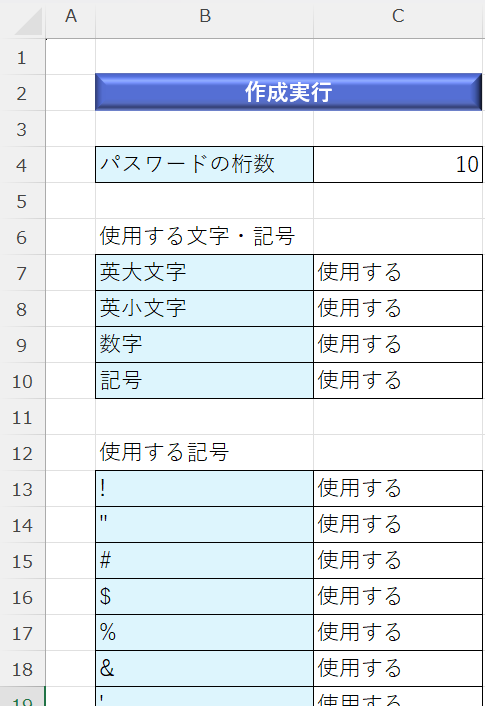
- セルC4に生成するパスワードの桁数を入力
- セル範囲C7:C10に文字・数字・記号の有無をプルダウンから選択
-
記号を使用する場合、セル範囲C13:C42の記号の使用の有無をプルダウンから選択
※記号を使用しない場合でも、セル範囲C13:C42は「使用する」のままで構いません - 実行
- セルB2の「作成実行」ボタンをクリックします
- 実行結果
- 一覧シートがアクティブになり、ファイルが保存され終了します
- 一覧シートのC列にパスワードが出力されます
- その他
- 一覧シートはのその他の項目は適宜使用して構いません
- 一覧シートのパスワード欄も自由に使用して構いませんが、上詰めで使用してください
- ファイル名は自由に変更することができます
- シート名の変更はしないでください

コード
Option Explicit
Sub makePass()
    '動作が速くなるおまじない開始
    With Application
        .ScreenUpdating = False
        .EnableEvents = False
        .Calculation = xlCalculationManual
        .Cursor = xlWait
        .DisplayAlerts = False
    End With

    'このファイルとシート
    Dim wb As Workbook
    Dim wsSet As Worksheet
    Dim wsTable As Worksheet

    '設定シートの情報
    Dim dig As Long 'パスワードの桁数
    Dim aUse As String '「使用する」という文字列
    Dim upperLettersUse As String '英大文字の使用の有無
    Dim lowerLettersUse As String '英小文字の使用の有無
    Dim numLettersUse As String '数字の使用の有無
    Dim symbolLettersUse As String '記号の使用の有無

    '使用する文字列
    Dim ArrLetters() As String
    Dim cntArrLetters As Long

    '出力文字列
    Dim outputPass As String

    '乱数
    Dim aRnd As Long

    'パスワードの判定
    Dim bool As Boolean
    Dim boolUpper As Boolean
    Dim boolLower As Boolean
    Dim boolNum As Boolean
    Dim boolSymbol As Boolean

    'カウンタ変数
    Dim i As Long, j As Long

    'このファイルとシート
    Set wb = ThisWorkbook
    With wb
        Set wsSet = .Sheets("設定")
        Set wsTable = .Sheets("一覧")
    End With

    '設定シートの内容
    With wsSet
        'プルダウンで使用している文字
        aUse = "使用する"
        'パスワードの桁数
        i = 4
        dig = .Range("C" & i).Value

        cntArrLetters = 0
        '英大文字
        i = i + 3
        upperLettersUse = .Range("C" & i).Value
        If upperLettersUse = aUse Then
            For j = 0 To 25
                ReDim Preserve ArrLetters(cntArrLetters)
                ArrLetters(cntArrLetters) = Chr(j + 65)
                cntArrLetters = cntArrLetters + 1
            Next j
        End If

        '英小文字
        i = i + 1
        lowerLettersUse = .Range("C" & i).Value
        If lowerLettersUse = aUse Then
            For j = 0 To 25
                ReDim Preserve ArrLetters(cntArrLetters)
                ArrLetters(cntArrLetters) = Chr(j + 97)
                cntArrLetters = cntArrLetters + 1
            Next j
        End If

        '数字
        i = i + 1
        numLettersUse = .Range("C" & i).Value
        If numLettersUse = aUse Then
            For j = 0 To 9
                ReDim Preserve ArrLetters(cntArrLetters)
                ArrLetters(cntArrLetters) = j
                cntArrLetters = cntArrLetters + 1
            Next j
        End If

        '記号
        i = i + 1
        symbolLettersUse = .Range("C" & i).Value
        If symbolLettersUse = aUse Then
            For j = 13 To .Range("B13").End(xlDown).Row
                If .Range("C" & j).Value = aUse Then
                    ReDim Preserve ArrLetters(cntArrLetters)
                    ArrLetters(cntArrLetters) = .Range("B" & j).Value
                    cntArrLetters = cntArrLetters + 1
                End If
            Next j
        End If

        cntArrLetters = cntArrLetters - 1
    End With

    'パスワードを作成していく
    outputPass = ""
    For i = 1 To dig
        Randomize
        aRnd = Int(Rnd() * cntArrLetters)
        outputPass = outputPass & ArrLetters(aRnd)
    Next i

    '隣合った文字列、または連続した文字列の場合、判定変数をFalseにする
    bool = True

    For i = 1 To dig - 1
        '英大文字
        If Asc(Mid(outputPass, i, 1)) >= 65 And Asc(Mid(outputPass, i, 1)) <= 90 Then
            If Abs(Asc(Mid(outputPass, i, 1)) - Asc(Mid(outputPass, i + 1, 1))) <= 1 Then
                bool = False
                Exit For
            ElseIf Abs(Asc(Mid(outputPass, i, 1)) + 32 - Asc(Mid(outputPass, i + 1, 1))) <= 1 Then
                bool = False
                Exit For
            End If
        End If
        '英小文字
        If Asc(Mid(outputPass, i, 1)) >= 97 And Asc(Mid(outputPass, i, 1)) <= 122 Then
            If Abs(Asc(Mid(outputPass, i, 1)) - Asc(Mid(outputPass, i + 1, 1))) <= 1 Then
                bool = False
                Exit For
            ElseIf Abs(Asc(Mid(outputPass, i, 1)) - 32 - Asc(Mid(outputPass, i + 1, 1))) <= 1 Then
                bool = False
                Exit For
            End If
        End If
        '数字
        If Asc(Mid(outputPass, i, 1)) >= 48 And Asc(Mid(outputPass, i, 1)) <= 57 Then
            If Abs(Asc(Mid(outputPass, i, 1)) - Asc(Mid(outputPass, i + 1, 1))) <= 1 Then
                bool = False
                Exit For
            End If
        End If
    Next i

    '英大文字の使用
    If bool = True Then
        If upperLettersUse = aUse Then
            boolUpper = False
            For i = 1 To dig
                If Asc(Mid(outputPass, i, 1)) >= 65 And Asc(Mid(outputPass, i, 1)) <= 90 Then
                    boolUpper = True
                    Exit For
                End If
            Next i
            If boolUpper = False Then
                bool = False
            End If
        End If
    End If

    '英小文字の使用
    If bool = True Then
        If lowerLettersUse = aUse Then
            boolLower = False
            For i = 1 To dig
                If Asc(Mid(outputPass, i, 1)) >= 97 And Asc(Mid(outputPass, i, 1)) <= 122 Then
                    boolLower = True
                    Exit For
                End If
            Next i
            If boolLower = False Then
                bool = False
            End If
        End If
    End If

    '数字の使用
    If bool = True Then
        If numLettersUse = aUse Then
            boolNum = False
            For i = 1 To dig
                If Asc(Mid(outputPass, i, 1)) >= 48 And Asc(Mid(outputPass, i, 1)) <= 57 Then
                    boolNum = True
                    Exit For
                End If
            Next i
            If boolNum = False Then
                bool = False
            End If
        End If
    End If

    '記号の使用
    If bool = True Then
        If symbolLettersUse = aUse Then
            With wsSet
                boolSymbol = False
                For i = 1 To dig
                    For j = 13 To .Range("B13").End(xlDown).Row
                        If .Range("C" & j).Value = aUse Then
                            If .Range("B" & j).Value = Mid(outputPass, i, 1) Then
                                boolSymbol = True
                                Exit For
                            End If
                        End If
                    Next j
                Next i
                If boolSymbol = False Then
                    bool = False
                End If
            End With
        End If
    End If

    If bool = False Then
        Call makePass
    Else
        With wsTable
            .Range("C10000").End(xlUp).Offset(1, 0).Value = outputPass
            .Activate
        End With

        wb.Save

        MsgBox "完了"
        '動作が速くなるおまじない終了
        With Application
            .ScreenUpdating = True
            .EnableEvents = True
            .Calculation = xlCalculationAutomatic
            .Cursor = xlDefault
            .DisplayAlerts = True
        End With
    End If
End Sub
コードの説明
54~107行目は設定シートの内容を変数に代入し、文字コードを文字に変換して配列に格納している部分です
69、80行目のChr関数は、数値(文字コード)を文字や記号、数字に変換する関数です
文字コード65~90がA~Zに、97~122がa~zに該当します
これを利用して配列に文字を格納しています
112~118行目でパスワードを生成します
115行目で乱数のリセットを行います
これを行わないと、毎回同じ数値が発生してしまいます
Rnd()で乱数を発生させ、ここに上限値をかけることで上限値未満の乱数を小数で発生させることができます
整数値(切り捨て)にしたいので、Intを使用しています
121~151行目で隣合う文字列や同じ文字・数字の連続は今回のツールの趣旨とはそぐわないので、
これらがあると判定をFalseにします
また、153~221行目で、「使用する」と指定した文字や数字・記号はすべて使用したいので、
使用されていなければ判定をFalseにします
223~224行目で、判定がFalseのとき再帰呼び出し(自分自身を呼び出す)をし、Trueになるまで繰り返します
Trueになったら、出力をし、動作を終了します